Getting Started#
Third-party Package Dependence#
MPICH — an MPI implementation library, available at http://www-unix.mcs.anl.gov/mpi/mpich
GSL — the GNU Scientific Library, downloaded at http://www.gnu.org/software/gsl
LAPACKE — the C-interface of LAPACK, downloaded at http://www.netlib.org/lapack/
CDNest — Diffusive nested sampling, downloaded at LiyrAstroph/CDNest
Note
In Linux systems, there are package managers that can install the above libraries convienently (except for CDNest). For example, DNF package managers in Fedora distribution. If so, use them. In such a case, the libraries usually are installed in standard environment path. Otherwise, if any of the above libraries is not installed in standard locations on your system, the Makefile provided with the code may need slight adjustments.
Compiling#
Edit the configurations in Makefile to be consistent with your system if necessary. Then compile the package with the command
make
This creates an executable file brains.
Running#
To run the package in a parallel computer/cluster, use the following command:
mpiexec -n np ./brains src/param
where np is the number of cores and param is the paramter file (see Parameter File), which specifies configurations for brains.
An exemplary reveberation mapping dataset is provided in the subdirectory data/, containing four files:
sim_con.txt                   # continuum light curve
sim_line.txt                  # 1d broad-line flux light curve
sim_line2d.txt                # 2d broad-line time series
sim_broadening.txt            # spectral broadening data
sim_sa.txt                    # spectral-astrometry data
One can try to run the above command to test brains with the provided dataset.
See Data Format for the information of data format.
Command-line Options#
brains also adimits several command-line options:
-h or --help
            print help information.
    -p or --post_proc
            only do posterior processing.
    -r or --restart
            restart from the backup.
    -t or --temperature or --temp
            specify tempering temperature in posterior processing.
    -s or --seed
            set a seed for the random number generator.
    -c or --recalc_info
            only do posterior processing, but recalculate the posterior sample information.
    -e or --exam_prior
            examine the priors.
    -v or --version
            print version.
    -n or --para_name
            print parameter name.
    -l or --load_prior
            load parameter prior from an input file.
For example, if one wants to redo posterior processing with a different temperature, say 10 (the default is 1), one may use the command
mpiexec -n np ./brains src/param -pt10
MCMC Sampling#
The output Markov chain is stored in data/posterior_sample.txt for continuum reconstuction,
in data/posterior_sample1d.txt for 1d reverberation mapping analysis, and
in data/posterior_sample2d.txt for 2d reverberation mapping analysis.
The parameter names and prior ranges are stored in data/para_names_con.txt
for continuum reconstuction, in data/para_names_model1d.txt for 1d reverberation mapping analysis, and
in data/para_names_model2d.txt for 2d reverberation mapping analysis. The column “Fix” of those
files indicates the prior type of the parameter with 1 referring to Gaussian and 2 referring to uniform.
See Adjusting Prior Ranges to see how to adjust the prior ranges of parameters.
One need to tune the corresponding option files OPTIONSCON, OPTIONS1D, and OPTIONS2D accordingly, which specify configurations for nested sampling.
Outputs#
brains outputs a series files for modeling results and visualizations. See Outputs for details
and Plotting Interface for visualizing the results.
An Exemplary Test#
Application to a mock reverberation mapping dataset, see Li, Y.-R., Songshen, Y.-Y., Qiu, J., et al. 2018, ApJ, 869, 137:
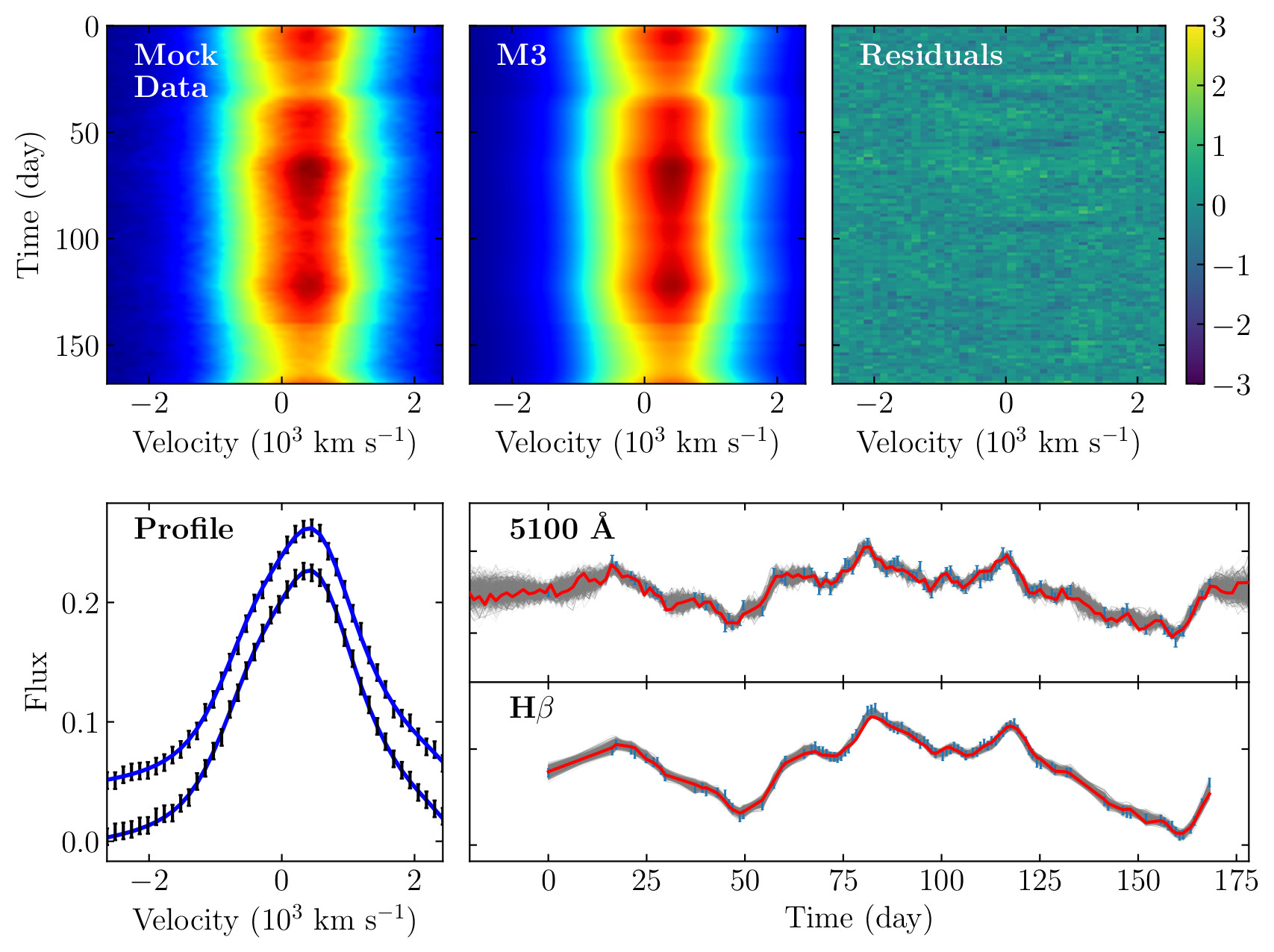
Fits to simulated reverberation mapping data.#